Facilities Cost Monitor is a universally applicable
intelligent decision support system for site-specific benchmarking,
estimating, planning and controlling the cost of facilities.
How does
Facilities Cost Monitor work?
It is a purpose-built
model built around detailed analysis of a massive first-hand-assembled database
of costs and performance – see below - which it interrogates in depth to draw
down accurate and reliable comparables for any specific building type,
specification and configuration.
For each
facilities service it takes into account the site-specific variables
affecting issues such as:
·
the scope and quantity
of work to be addressed,
·
levels of
performance,
·
the design and
specification of buildings and their contents,
·
user activity,
·
operational
conditions,
·
internal and
external environmental conditions and
·
micro/macro-economic
market conditions
- at any date past, present or future.
Who is
behind Facilities Cost Monitor?
Facilities Cost Monitor was created by Bernard Williams FRICS, formerly senior partner of, and now an active consultant to, Bernard Williams Associates (BWA) a UK-based professional consultancy specialising in facilities
economics. BWA are widely recognised as being leaders in the field of
benchmarking facilities services; their unique and massive database forms the
back-bone of the Facilities Cost Monitor model.
The program is developed and marketed by International
Facilities and Property Information Ltd. (IFPI) which also publishes a wide
range of books and electronic teaching aids in this specialist field.
What is so
special about Facilities Cost Monitor?
Size and accuracy of database
The 2 million-plus data entries from which the base model is
constructed is drawn from BWA’s records, painstakingly compiled over 40 years
experience of specialist facilities benchmarking consultancy. The data has been
gathered and analysed at first hand by BWA’s team of fully qualified Chartered
Quantity Surveyors from the facilities cost records of some 500 users in over
10,000 buildings in the UK and internationally.
No second-hand data of any description is used in
calibrating the Facilities Cost Monitor program
With Facilities Cost Monitor users are able to benchmark
current performance against a modelled peer group for a wide range of
facilities services from ‘maintenance’ to ‘document distribution’.
Eliminates ‘background
noise’
The program eliminates all the background noise normally
associated with conventional high-level estimating and benchmarking processes
i.e.: the resource drivers affecting service level requirements, cost of
operations, and quality of performance, e.g.
·
age,
·
labour
rates and costs of employment,
·
problems
of access
·
etc.
etc.
which are taken into account when
extracting the peer group comparisons from the database for estimating and benchmarking.
Uses all the key
variables
Facilities Cost Monitor has leap-frogged
conventional benchmarking techniques by modeling all the key variables influencing
cost and quality and producing a realistic estimate of what a service should
cost in any normal range of circumstances if procured and managed efficiently.
Cost
comparables offered by the program in each service are the result of a
combination of all or most of the following cost drivers which impact
upon the cost of each service:
·
scope of the
service
- user service level requirements
- site-generated problems/hazards
- building specification and
design
- areas or volumes to be dealt
with
- labour rates and employment
on-costs
- consumables costs
- market forces
- location
- date
- productivity levels
- and many others
Cost drivers
weighted and valued
The weightings and values of each of
these cost drivers have been evaluated by the authors using their vast
first-hand-gathered database and practical experience of facilities economics;
these weightings and values have been applied not to the cost centre as a
whole, but to each sub-element of each cost centre.
So Cleaning, for instance, is
analysed in respect of sub-elements such as:
·
Walls
·
Windows
·
Occupiable
areas
·
Furniture
and equipment
·
‘Special’
areas
·
Waste
management
·
Pest control
The level of accuracy of the program
is significantly enhanced by modelling the results at this level of detail and
can only be achieved because of the robustness of the database and the
thoroughness with which it has been modeled.
However users do not need to have
their own costs analysed to the same level of detail – they merely need to
know the scope of the service and some key facts affecting its delivery.
Accurate
The level of accuracy of the program
is significantly enhanced by modelling the results at this level of detail and
can only be achieved because of the robustness of the database and the
thoroughness with which it has been modeled.
However users do not need to have
their own costs analysed to the same level of detail – they merely need to
know the scope of the service and some key facts affecting its delivery.
Drilling down
A
big feature of the EstatesMaster program is the way it helps you to get a good,
reliable initial overview of your facilities’ performance with a very small
time-input.
However,
having made your first pass at the typical features of your buildings and the
quality of their facilities services you can then begin to ‘drill down’ into
the detail of the estate by answering the questions in respect of some of the
more important buildings on an individual building basis.
Every
time you evaluate the estate’s facilities performance using FCM EstatesMaster
you can run a Report showing:
- the
questions and your answers
- the
overall results for the estate – predictions v actual
- the
overall predictions for the group of buildings
- the
predictions for individual buildings
- the
reasons for any answers and reminders to go back and check out the data.
Tests any service
level or building option – against best performance
Facilities Cost Monitor is much more than just a
highly flexible estimating and benchmarking tool: the program can be a catalyst
for creation of a best value facilities regime by facilitating instant
sophisticated sensitivity analysis of the cost of facilities options.
The database extends across all
major building types. Uniquely it is distilled down to include only the best
performance results in respect of cost/quality achievement.
User-friendly
The screens require the user to
answer straightforward questions about their costs, areas, headcount, building
design/specification, performance achievement and other the other key resource
drivers described above.
Provided users have a reasonable
knowledge of their facilities (or access to others who do – like consultants or
contractors) they should have no problem at all in completing the
questionnaires which form the basis of the system.
Each screen is supported by a detailed
written ‘Helptext’ giving definitions of specialist terms and advice on
how to complete the answers to the questions.
Drawing from the autors’ extensive
experience of working with Facilities Managers in the course of consultancy
activities the whole model has been designed to overcome the worst of the
problems which the authors know are likely to occur as a result of:
- mis-analysis of users’ cost
data
- inconsistency of classification
of costs and measurement parameters
- lack of understanding of
technical terms
- lack of formal records with
regards to levels of quality and/or cost breakdowns
The program is fully automated being
designed to provide reasonably accurate estimates and benchmarks without the
need for any consultancy interface. However, there is also a Help-line
for users to contact for expert guidance in the unlikely event that they have
any problems in filling in the answers to the simple questions posed - or even
if they don’t like the results the programs generate!
Universal application
Facilities
Cost Monitor is
calibrated to estimate and benchmark costs of facilities in the major regions
of following countries :
·
UK
·
USA
·
Australia
·
Canada
·
France
·
Germany
·
Spain
·
Italy
·
Republic of Ireland
Other
countries can be made available on request and Licensees will be informed of
new options as they come on stream.
What does it cost?
Licence fees are payable annually to
IFPI Ltd on a set fee scale which varies according to the number of program
users (seats) and number and size of buildings. Details of these fees can be
made available against a specific proposal.
Fees for one-off applications can be
pre-arranged with IFPI Ltd.
Return to Menu
CASE STUDIES
CASE
STUDY
Facilities
Cost Monitor
Facilities
Policy and Budget Allocation – Local Authority
A
major Local Authority was moving its administrative functions into a new
building in the city centre. The newly formed strategic fm group (ICF) were
tasked with setting the budgets for all the facilities services and justifying
the figures by reference to:
- peer
group performance
- alternative
performance levels – higher and lower
Under
the guidance of a facilitator the whole ICF team went through each cost centre
using the Facilities Cost Monitor to show them the performances options and their
budget implications.
The
costs indicated were, of course, generated by the site-specific cost drivers
identified by the questions asked in the program.
The
ICF found the Helptext really useful when deciding on the appropriate standards
of specification in the new building. Every now and then they asked to see the
cost implications of the menu options – these were displayed instantly on the
screen and enabled the team to make value judgements on the quality ranges in a
fraction of the time it would have taken them without access to the program. In
fact, the complete process was done and dusted in less than 3 hours.
The
ICF’s decisions were encapsulated in the FCM Report which recorded the
decisions they had taken in respect of each of the questions in the program. It
enabled complete buy-in of the whole team to the policy decided upon –with
its cost implications - in every one of the facilities services they would be
procuring.
The
results of their deliberations using the FCM as a catalyst were as follows:
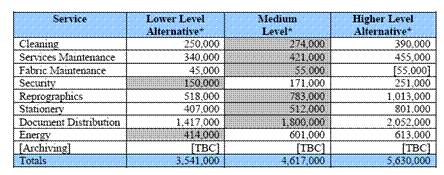
This
information was incorporated in the officers’ report to their Council
requesting confirmation of the facilities policy for the new building and the
budget implications.
CASE
STUDY
FCM
EstatesMaster
Re-tender
or re-negotiate services contract?
A
Central Government Department was deliberating over whether to re-tender a
major service contract covering 5 buildings or to re-negotiate with the
incumbent provider.
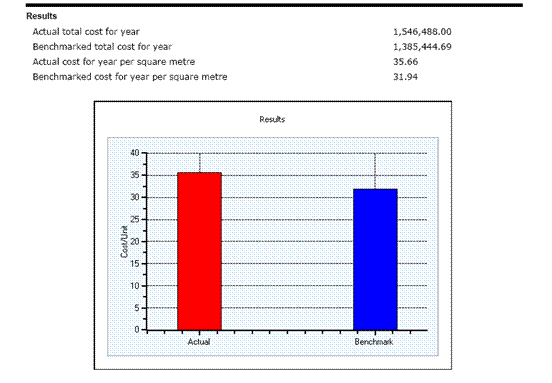
Using
the FCM EstatesMaster program they found that the price they were paying was
close to best performance for the scope and quality being provided.
They
therefore re-negotiated the contract continuing a good partnership without
unnecessary costs and disruptions on either
side.
CASE STUDY
Facilities
Cost Monitor – EstatesMaster
Global
cost management
A
major international engineering enterprise used the FCM EstatesMaster program
to set up a cost control mechanism for its global estate of 1.2m sq.m.
They
appointed a ‘champion’ from among their ICF team to work with a facilitator to
set the program up for all their 10 sites – 7 in UK and 3 overseas.
The
results identified a good performance in most areas when set against the peer
group in the program’s database. However, one or two sites were significantly above
the program’s benchmark for some of the services.
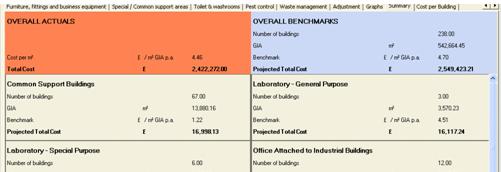
Notice
that even with over 200 buildings and ½ million sq.m of Gross Floor Area the
benchmark is still within 5% of the actual cost for this particular facilities
service cost centre. Nevertheless when individual buildings were checked there
were some poor as well as excellent outcomes.
The
company has used these and the other results to identify best performance on
its estate and has made changes which have affected substantial improvements in
value for money. Use of the program is now being extended to other parts of the
organisation in other countries; EstatesMaster will now be updated on a
continual basis as a total estate cost control mechanism .
The
following is an extract from the summary:
CASE
STUDY
Facilities
Cost Monitor – Negotiation of contract extension
A
large London financial services organisation had a very good partnership going
with their cleaning contractor but the contract period was nearly up – so how
could they avoid losing this excellent service provider in a re-tender
scenario?
The
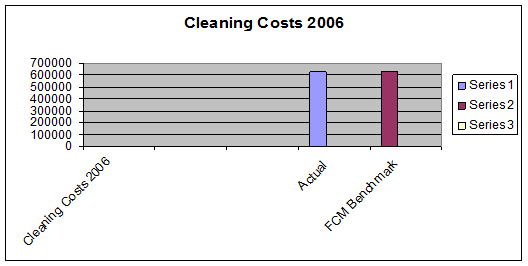
answer was to use the Facilities Cost Monitor cleaning module to benchmark the
contractor’s proposals for an extension of the contract for a further 2 years.
The
program was populated and run by an independent surveyor – neither party had
any influence on the way the questions were answered other than to provide
factual information. The Report from the FCM program showing all the questions
as answered was appended to the benchmark result.
Actually
the bid was within 1% of the FCM benchmark so there was no contest.
CASE
STUDY
FCM
EstatesMaster – International benchmarking
An
internationally-based dugs company wanted to get a handle on how their costs
and performance compared across their portfolio of offices and laboratories in USA, UK and mainland Europe.
The
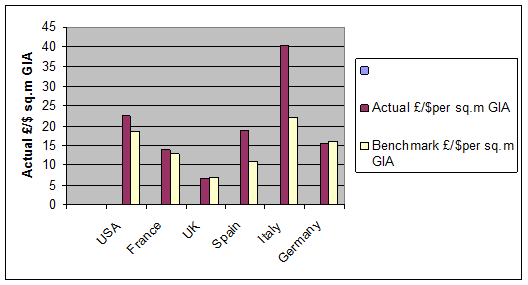
process highlighted some very big differences in costs on some sites between
the Benchmarks and Actuals in several of the Services tested using
EstatesMaster.
Note
that the benchmarks and actuals shown below are given in the local currency –
the program does not dabble in currency conversion which is a benchmarking
minefield. However the diagram below when converted to a common currency does
show a wide disparity of costs as between the sites as well as between the
actuals and benchmarks on each site. Sometimes this was justifiable and
sometimes it wasn’t – time for a thorough review in a couple of situations
The
same company also benchmarked all of the Service Charges on its tenanted
properties. This facility is unique to the FCM program and opened up some
interesting lines of enquiry
Return to Menu
Frequently Asked Questions
Q How do we know the database
is accurate?
A. The data has been selected and processed by Bernard Williams Associates (BWA) who are recognised as leading specialists in the field.
The data is collected at
first hand by BWA’s team of Chartered Quantity Surveyors in the course of
carrying out facilities cost benchmarking studies for major national and
international users.
Q Is
the program kept up to date?
A The program is updated continually. Licensees automatically
access the most up-to date calibrations having been notified of the nature,
extent and reasons for the modifictions.
Q Which
building types does it cover?
A The program is not user-type-specific – it can be used for
offices, retail outlets, schools, hospitals and so on; it asks questions about
the building and how it is used, the answers to which generate best performance
cost levels appropriate to the job that has to be done in each case. It does of
course reflect the physical characteristics of each building and particular
specification details
Q How
well qualified are the authors of the program?
A The program has been developed from first principles by Bernard Williams FRICS. Bernard is widely regarded as an authority on facilities cost and
performance benchmarking having been chosen by Eurofm to validate their
facilities benchmarking initiative. He has recently completed a commission from
the EC to benchmark the cost of construction in the 15 EU countries.
He is a Visiting
Professor at the Centre for Facilities Management and Development at Sheffield University and was recently voted one of the ‘TopTwenty Pioneers of Facilities
Management’ by the BIFM’s Facilities Management Journal.
Bernard is author of the best selling reference works ‘An
Introduction to Benchmarking Facilities’,‘Facilities Economics’ and ‘Whole-life
Economics of Building Services’
Q Does
the program take into account regional variations?
A The data is separately indexed to
all major economic regions in each country in the database.
Q Does it take into account
premium rates that must be paid in certain areas at certain times?
A The program has the facility to take on board any abnormal
local premium rates of pay.
Q What happens if our costs
include work not envisaged in the scope of the program?
A If your costs include work outside of the scope of the
program (e.g. maintenance of special equipment) there is a facility to exclude
such costs from the calculations.
Q Can we use our own database
in place of the one in the program?
A The database the program uses is specially selected as
representing ‘best performance’ cost targets from a much wider selection of
cost data covering over 500 top-drawer users in the public and private sectors.
However, if you would
prefer to substitute comparative costs from your own database this can be
arranged at an extra cost negotiated directly with the Licensor.
Q What sort of companies are in
the database?
A The database contains ‘best performance’ cost data drawn
from the records of over 500 organisations managing facilities in over 10,000
buildings.
Among the 500+ national
and international organisations represented in the core database are:
- Bank of England
- Financial
Services Authority
- NATS
- Dti
- DHSS
- BAT
- MoD
- Zurich
- WH Smith
- Kodak
- Superdrug
- Rolls
Royce
All the data in the
program has been specifically selected as representing best performance in
management of facilities costs.
Q. Does anyone else have access to our
data and benchmarking surveys?
A. Definitely not – apart from the Licensor and the authors who
need to be able to monitor input to the site for purposes of quality control (
see Licence Agreement). The Licence Agreement contains a Confidentiality
clause. If required (but really quite unnecessary) your organisation can be
entered into the program under a pseudonym and even your buildings can be made
anonymous using code numbers
Return to Menu
Facilities Cost
Monitor
EstatesMaster Version
QUOTATIONS
When you let us know your
requirements in these respects we will
e-mail
your quotation.
LICENCE AGREEMENT
The
following Licence Agreement is universally applicable. Before registering on
the site as a Licensed User you will be required to tick confirm that you
accept the terms and conditions of this Agreement at which point you will be deemed
to have accepted them in their entirety.
For Licence
Fees in excess of £5000 we will require written signatures of both Licensor and
Licensee on hard copies of this Licence Agreement which will be presented to
you as a Licensee/Licensor – specific document.
For
contracts under £5000 this amount this formality is at the option of either
party
SOFTWARE LICENCE
Date
Parties:
1.
‘The Licensor’: International Facilities and Property Information
Limited (“THE LICENSOR”) whose registered office is at Kings House,
32-40 Widmore Road, Bromley, Kent, BR1 1RY, United Kingdom.
2.
'The Licensee': 
Recital
The Licensor
hereby grants the Licensee a non-exclusive, non transferable licence to use the
Products listed in the Schedule annexed hereto (“the Schedule”) subject to (a)
the use of agreed database(s), (b) the terms of this licence
Definitions
In this
agreement unless the context otherwise requires:
"Designated
Equipment"
means the minimum equipment specification as published from time to
time by The Licensor or the equipment / machine identified in the
Schedule"Licence Fee" means the fee for this licence set out in the
Schedule
“Internet-enabled
Services’’ means any or all of the pages displayed on
the screen of the PC or Laptop (whether or not projected on a remote screen)
when the program is accessed.
"Licensed
Programs" means the internet-enabled programs in
object code form identified in the Schedule including any new release of the
same made or issued together with any new software programs or enhancements to
existing software programs developed by the Licensor for use by the Licensee
"Licensed Program
Materials" means
the Licensed Programs, the internet-enabled screens they afford and the Program
Documentation
"Program
Documentation" means
the instruction manuals user guidelines technical literature and other
information to be made available from time to time during this Agreement by the
Licensor at its discretion in either printed or machine readable form to the
Licensee
"Program
Specifications" means
the specifications from time to time published by the Licensor in respect of
the Licensed Programs
“Products” includes but is not limited to internet-enabled
programs, software, user licences, bespoke developments or enhancements and
program documentation
“Standard Terms
and
Conditions” means the Licensor’s Standard Terms and Conditions of Business
prevailing from time to time where such has been made available to the Licensee
for inspection
1. Grant of
Licence
The Licensor in
consideration of the payment by the Licensee of the Licence Fee hereby grants
to the Licensee a non-exclusive non-transferable licence to use the Licensed
Programs (and where appropriate the Program Documentation) and to possess and
refer to the Program Documentation.
2. Licence
Fee
In
consideration of the grant of this licence by the Licensor the Licensee shall
pay to the Licensor the Licence Fee within 30 days of date of Licensor’s
invoice for the same or on the date of accessing the program whichever is the
earlier. If any further fees shall become payable during this Agreement, the
Licensor and the Licensee shall agree the particulars in an addendum to form
part of this Agreement; such additional fees due shall be paid within 30 days
of date of the Licensor’s invoice for the same or on the date of accessing the
programs, documents or other products which are the subject of the extended
agreement whichever is the earlier.
3. Property and confidentiality in the Licensed Program
Materials
3.1
The Licensed Program Materials contain confidential information of the
Licensor and all copyright trade marks and any other industrial or intellectual
property rights in the Licensed Program Materials are the exclusive property of
and remain vested in the Licensor.
3.2
The Licensee shall not:
3.2.1
save as provided for herein make back-up copies of the Licensed Program
Materials;
3.2.2
reverse compile, copy or adapt the whole or any part of the Licensed
Program Materials for the purposes of correcting errors in the Licensed Program
Materials;
3.2.3
assign transfer sell lease rent charge or otherwise deal in or encumber
the Licensed Program Materials or use the Licensed Program Materials on behalf
of any third party or make available the same to any third party without the
previous consent in writing of the Licensor; or
3.2.4
remove or alter any copyright or other proprietary notice on any of the
Licensed Program Materials.
3.3
The Licensee shall:
3.3.1
keep confidential the Licensed Program Materials and limit access to the
same to those of its employees agents and sub-contractors who either have a
need to know or who are engaged in the Use of the Licensed Programs (including
where appropriate the Program Documentation);
3.3.2
reproduce on any copy (whether in machine readable or human readable
form) of the Licensed Program Materials the Licensor’s copyright and trade mark
notices;
3.3.3
notify the Licensor immediately if the Licensee becomes aware of any
unauthorised use of the whole or any part of the Licensed Program Materials by
any third party; and without prejudice to the foregoing take all such steps as
shall from time to time be necessary to protect the confidential information
and intellectual property rights of the Licensor in the Licensed Program
Materials.
3.3.4
inform all relevant employees agents and sub-contractors that the
Licensed Program Materials constitute confidential information of the Licensor
and that all intellectual property rights therein are the property of the
Licensor and the Licensee shall take all such steps as shall be necessary to
ensure compliance by its employees agents and sub-contractors with the
provisions of this clause.
4. Copying
of the Licensed Programs
The Licensee
shall not make any copies of the internet-enabled screens.
5. Warranty
5.1
Subject to the exceptions set out in clause 6.4 below and the
limitations upon its liability referred to below the Licensor warrants that its
title to and property in the Licensed Program Materials is free and
unencumbered and that it has the right power and authority to license the same
upon the terms and conditions of this licence.
5.2
The Licensee shall give notice to the Licensor as soon as it is
reasonably able upon becoming aware of a breach of warranty.
5.3
The Licensor shall have no liability to remedy a breach of warranty
where such breach arises as a result of any breach by the Licensee of any of
its obligations under this licence or other agreement to which the Licensor’s
Standard Terms and Conditions of Business apply.
5.4
Subject to the foregoing all conditions warranties terms and
undertakings express or implied statutory or otherwise in respect of the
Licensed Program Materials are hereby excluded.
6. Limitation
of Liability
The provisions
set out in the Licensor’s Terms and Conditions of Business state the Licensor’s
entire liability (including any liability for the acts and omissions of its
employees, agents and sub-contractors).
7. Intellectual
Property Rights Indemnity
7.1
The Licensor will indemnify and hold harmless the Licensee against any
damages (including costs) that may be awarded or agreed to be paid to any third
party in respect of any claim or action that the normal operation of the
Licensed Program Materials by the Licensee infringes the patent copyright
registered design or trade mark rights of said third party (an “Intellectual
Property Infringement”) provided that the Licensee:
7.1.1
gives notice to the Licensor of any Intellectual Property Infringement
forthwith upon becoming aware of the same;
7.1.2
gives the Licensor sole conduct of the defence to any claim or action in
respect of an Intellectual Property Infringement and does not at any time admit
liability or otherwise settle or compromise or attempt to settle or compromise
the said claim or action except upon the express instructions of the Licensor;
and
7.1.3
acts in accordance with the reasonable instructions of the Licensor and
gives to the Licensor such assistance as it shall reasonably require in
respect of the conduct of the said defence including without prejudice to the
generality of the foregoing the filing of all pleadings and other court
processes and the provision of all relevant documents.
7.2
The Licensor shall reimburse the Licensee its reasonable costs incurred
in complying with the provisions of clause 8.1 above.
7.3
The Licensor shall have no liability to the Licensee in respect of an
Intellectual Property Infringement if the same results from any breach of the
Licensee’s obligations under this licence or other agreement between the
Licensor and the Licensee to which the Licensor’s Standard Terms and Conditions
of Business apply.
7.4
In the event of an Intellectual Property Infringement the Licensor shall
be entitled at its own expense and option either to:
7.4.1
procure the right for the Licensee to continue using the Licensed
Program Materials; or
7.4.2
make such alterations modifications or adjustments to the Licensed
Program Materials so that they become non-infringing without incurring a
material diminution in performance or function; or
7.4.3
replace the Licensed Program Materials with non-infringing substitutes
provided that such substitutes do not entail a material diminution in
performance or function.
8. Agreement
between the Parties
8.1
The Licensor shall not be liable to the Licensee for loss arising from
or in connection with any representations agreements statements or undertakings
made prior to the date of execution of this agreement other than those
representations agreements statements and undertakings confirmed by a duly
authorised representative of the Licensor in writing or expressly incorporated
or referred to in this agreement or the Licensor’s Standard Terms and
Conditions of Business.
8.2
The Licensee accepts that the Licensed Program Materials are not
designed and produced to its individual requirements and that it was
responsible for their selection.
8.3
This agreement together with any other agreement entered into between
the Licensor and the Licensee shall form the entire agreement between the
parties and no addition to or modification of these shall be binding upon the
parties unless made by a written instrument signed by a duly authorised
representative of each of the parties.
9 Not used
10 Licensee’s Representatives
The Licensee shall communicate to
the Licensor the identity of the persons or the department within its
undertaking who shall act as the sole contact point and channel of
communication for the provision by the Licensor of the Products, Services or
Hardware. The Licensee shall forthwith inform the Licensor of any change in the
identity of any such persons or department.
The Licensee will also communicate
to the Licensor the names and e-mail addresses of the 3 (three) nominated users
of the program who will thereupon be allocate personal User Names and Passwords
to enable them to enter into and operate the program. Save for these nominated
users (all of whom must be directly employed by the Licensee) no other party is
permitted to enter into and/operate the site without the express written
permission of the Licensor.
Neither the Licensee nor its
nominated users shall divulge the User Names and Passwords to any other person
whether or not employed by the Licensee. The Licensor reserves the right to
change the User Names and Passwords at any time.
11 Termination
This agreement may be terminated
forthwith:
11.1.
by the Licensor if the Licensee fails to pay any sum due thereunder
within 30 days of the due date therefor;
11.2.
by either party if the other commits any material breach of any term of
any agreement between the parties and which (in the case of a breach capable of
being remedied) shall not have been remedied within 30 days of a Notice being
given to remedy the same;
11.3.
by either party if the other shall convene a meeting of its creditors or
if a proposal shall be made for a voluntary arrangement within Part 1 of the
Insolvency Act 1986 or a proposal shall be made for a voluntary arrangement
with (or assignment for the benefit of) its creditors or if the other shall be
unable to pay its debts within the meaning of section 123 of the Insolvency Act
1986 or if a trustee receiver administrative receiver or similar officer is
appointed in respect of all or any part of the business or assets of the other
or if a petition is presented or a meeting is convened for the purpose of
considering a resolution or other steps are taken for the winding up of the
other or for the making of an administrative order (otherwise than for the
purpose of an amalgamation or reconstruction).
The Termination of any agreement
pursuant to this clause shall be without prejudice to any other rights or
remedies a party may be entitled to hereunder, other agreement between the
parties, or at law and shall not affect any accrued rights or liabilities of
either party nor the coming into or continuance in force of any provision
hereof or such other agreement which is expressly or by implication intended to
come into or continue in force on or after such Termination.
12 Force Majeure
Neither
party shall be liable for any breach of its obligations resulting from causes
beyond its reasonable control including but not limited to fires strikes (of
its own or other employees) insurrection or riots embargoes container shortages
wrecks or delays in transportation inability to obtain supplies and raw
materials requirements or regulations of any civil or military authority (an
“Event of Force Majeure”).
Each of the parties agree to give
Notice forthwith to the other upon becoming aware of an Event of Force Majeure
such Notice to contain details of the circumstances giving rise to the Event of
Force Majeure.
If a default due to an Event of
Force Majeure shall continue for more than 26 weeks then the party not in
default shall be entitled to Terminate any agreement. Neither party shall have
any liability to the other in respect of the Termination of any agreement as a
result of an Event of Force Majeure.
13 Waiver
The waiver by the Licensor of a
breach or default by the Licensee of any of these terms and conditions or of
that contained in any other agreement between the parties shall not be construed
as a waiver of any breach of the same or other terms and conditions nor shall
any delay or omission on the part of the Licensor to exercise or avail itself
of any right power or privilege that it has or may have hereunder operate as a
waiver of any breach or default by the Licensee.
14 Notices
Any notice, request, instruction
or other document to be given hereunder shall be delivered or sent by first
class post or by electronic mail or facsimile transmission (such electronic
mail or facsimile transmission notice to be confirmed by letter posted within
12 hours to the address or to the e-mail/facsimile number of the other party
set out in this agreement (or such other address or numbers as may have been
notified hereunder) and any such notice or other document shall be deemed to
have been served (if delivered) at the time of delivery or (if sent by post)
upon the expiration of 48 hours after posting.
THE
LICENSOR
Address: Kings House 32-40 Widmore Road Bromley Kent UK BR1 1RY
e-mail: info@int-fpi.com
Fax: +44
(0)208 313 3363
THE
LICENSEE
Address
e-mail
Fax:
15 Invalidity and
Severability
If any provision of these Standard
Terms and Conditions of Business or terms and conditions contained in any other
agreement between the parties shall be found by any court or administrative
body of competent jurisdiction to be invalid or unenforceable the invalidity or
unenforceability of such term or condition shall not affect other terms and
conditions and all such others not affected by such invalidity or unenforceability
shall remain in full force and effect. The parties hereby agree to attempt to
substitute for any invalid or unenforceable term or condition a valid or
enforceable term or condition which achieves to the greatest extent possible
the economic legal and commercial objectives of the invalid or unenforceable
term or condition.
16 Successors
These terms and conditions together with those contained in any other
agreement between the parties shall be binding upon and endure for the benefit
of the successors in title of the parties hereto.
17 Assignment and Sub-Licensing
The Licensee shall not be entitled
to assign or otherwise transfer any agreement with the Licensor nor any of its
rights or obligations thereunder nor
sub-licence the use (in whole or in part) of any Products without the prior
written consent of the Licensor
18 Headings
Headings to clauses in these
Standard Terms and Conditions of Business or other agreement between the
parties are for the purpose of
information and identification only and shall not be construed as forming part
thereof.
19 Limitation of Liability
19.1 The following provisions set out the Licensor’s entire
liability (including any liability for the acts and omissions of its
employees agents and sub-contractors) to the Licensee in
respect of:
19.1.1 any breach of its contractual obligations arising under this
Software Licence, or any other agreement entered into between the
Licensor and the Licensee; and
19.1.2 any representation statement or tortious act or omission
including negligence arising under or in connection with this Software
Licence or any other agreement entered into between the Licensor and the
Licensee
19.2 Any act or omissions on the part of the Licensor or its
employees agents or subcontractors falling within clause 19.1 above shall for
the purposes of this clause 19 be known as an “Event of Default”.
19.3
the Licensor’s liability to the Licensee for death or injury resulting
from its own or that of its employees’ agents’ or sub-contractors’ negligence
shall not be limited.
19.4
the Licensor shall not be liable to the Licensee for loss of data
(including loss or damage suffered as a result of an action brought by a third
party) even if such loss was reasonably foreseeable or the Licensor had been
advised of the possibility of the Licensee incurring the same.
19.5
Subject to the provisions of clause 19.3 above the Licensor’s entire
liability in respect of any Event of Default shall be limited to damages of an
amount equal to the aggregate of the Licence Fee paid in the immediately
preceding period of 12 months.
19.6
Subject to clause 19.3 above the the Licensor shall not be liable to the
Licensee in respect of any Event of Default for loss of profits goodwill or any
type of special indirect or consequential loss (including loss or damage
suffered by the Licensee as a result of an action brought by a third party)
even if such loss was reasonably foreseeable or the Licensor has been advised
of the possibility of the Licensee incurring the same.
19.7
If a number of Events of Defaults give rise substantially to the same
loss then they shall be regarded as giving rise to only one claim.
19.8
The Licensee hereby agrees to afford the Licensor not less than 30 days
(following Notice thereof by the Licensee) in which to remedy any Event of
Default hereunder.
19.9
Except in the case of an Event of Default arising under clause 19.3
above the Licensor shall have no liability to the Licensee in respect of any
Event of Default unless the Licensee shall have served Notice of the same upon
the Licensor within 3 months of the date it became aware of the circumstances
giving rise to the Event of Default or the date when it ought reasonably to
have become so aware.
19.10
Nothing in this clause shall confer any right or remedy upon the Licensee
to which it would not otherwise be legally entitled.
20 Disputes
Any dispute which may arise
between the parties shall be determined
as follows:
20.1.
if the dispute shall be of a technical nature concerning Products ,
Services or Hardware provided or any similar or related matter then such
dispute shall be referred for final settlement to an expert nominated jointly
by the parties or, failing such nomination within 14 days of either party’s
request to the other therefor, nominated at the request of either party by the
President from time to time of the British Computer Society. Such expert shall
be deemed to act as expert and not as arbitrator. His decision shall (in the
absence of clerical or manifest error) be final and binding on the parties and
his fees for so acting shall be borne by the parties in equal shares unless he
determines that the conduct of either party is such that such party should bear
all of such fees;
20.2.
in any other case the dispute shall be determined by the High Court of
Justice in England.
English Law will govern all contractual agreements
entered into by the Licensor and the Licensee
hereby agrees to submit to the non-exclusive jurisdiction of the English courts.
21 The
Service
The Licensee is responsible for
providing the necessary documents and other materials and data which it wants
to upload on to the Licensor’s site. The Licensee should note the restrictions
on the use of the service in terms of the volume of information, materials and
data which the Licensee is permitted to store and/or submit.
The Licensor reserve the right to
refuse any information, materials and other content which do not meet the
requirements of the service.
The Licensor reserve the right to
change the service at any time, provided that the modified service will not be
of materially worse functionality than before.
The Licensor cannot guarantee that
Licensor’s site will be accessible all the time or free from interruption or
delay. However the Licensor will take reasonable steps to ensure this. In
addition, The Licensor will take reasonable steps to ensure that the Licensor’s
site is secure and the content’s integrity maintained and there are suitable
back up procedures in place to protect the Licensee’s content. If, however,
despite taking these reasonable steps data is lost or becomes corrupted, the
Licensor will not be liable for any loss or damage to such content and
materials. If any data or content is lost prior to being backed up, Licensee
will need to re-input it.
The Licensor will provide
assistance to the Licensee as requested via the Helptext function with regard
to the interpretation of the contents of the program, meanings of terms used
and other matters not directly concerned with the Licensee’s own input to the
program and/or the output obtained.
The Licensor will assist the
Licensee to overcome any difficulties of an administrative nature encountered
in setting up and/or entering data into the program.
The Licensor is not under any
obligation to discuss the operation of the program with the Licensee insofar as
any query raised relates to the accuracy or reliability of the result obtained
from the output, the calibration of the program from which it derives or the
accuracy or validity of the Licensee’s input. If required the Licensor will
assist the Licensee to procure technical and/or professional consultancy advice
in connection with the results of any input and/or the validity of the data
input from which a result is derived.
22 Hosting
data content
The Licensor will host the content
of data entered by Licensee on to the Licensor’s site
The Licensor reserve the right to
remove data content without giving prior written notice to the Licensee in the
following circumstances:
a) the content of the upload
is offensive , illegal or otherwise does not comply with these terms of use.
23 Uploading
material to the Licensor’s site
Any material the Licensee uploads
to the Licensor’s site will be considered confidential and proprietary, however
the Licensor shall have the right to use any such material for the purposes of
validating the calibration of the program or for any other purpose connected
with improving the quality of the program. The Licensor does not have the right
to disclose the Licensee’s identity to any third party without the Licensee’s
express written permission
The Licensor will not be
responsible, or liable to any third party, for the content or accuracy of any
materials posted by the Licensee or any other user of the Licensor’s site.
The Licensee is responsible for
ensuring that the equipment the Licensee uses for uploading information,
content and/or data onto the Licensor’s site, such as computers, mobile phones
or any other means is the Licensee’s personal property. If the equipment does
not belong to the Licensee, the Licensee (and/or the owner of the equipment)
will incur a charge for the usage of the equipment, it is the Licensee’s
responsibility to obtain the owners’ consent prior to uploading any material on
to The Licensor’s site.
24 Monitoring
Content
The Licensor will actively monitor
the content submitted by all Licensees for the purposes described in 23
above.. The Licensee acknowledges that it is solely responsible for all
content, data or images that Licensee uploads and/or stores using the service.
Without prejudice to the foregoing, the Licensor reserve the right to review
materials stored and/or posted and to remove any materials and other content in
its sole discretion.
The Licensor reserves the right at
all times to disclose any information the Licensor may deem necessary to
satisfy any applicable law, regulations, legal process or governmental request,
or to edit, refuse to post, suspend or remove any information content or
materials, in whole or in part in the Licensor’s sole discretion.
The Licensor also has the right to
disclose the Licensee’s identity to any third party who is claiming that any
materials posted or uploaded by the Licensee to the Licensor’s site
constitutes a violation of their intellectual property rights, or of their
right to privacy or is otherwise unlawful or claimed to be unlawful.
25 Intellectual
Property in the Licensee’s Content
The Licensor does not claim
ownership of the intellectual property rights in relation to the content
submitted by the Licensee (“The Licensee’s Content”). However, by submitting
The Licensee’s Content to the Licensor’s site the Licensee grants to the
Licensor the right to use The Licensee’s Content for the purposes described in
23 above
26 Termination
The Licensor may terminate The
Licensee’s registration, and remove The Licensee’s Content, at any time, with
or without notice, in the Licensor’s sole discretion, if, the Licensee is in
breach of any of these terms of use or if any competent authority requires us
to do so.
The Licensor may terminate the
hosting of The Licensee’s Content and suspend the Licensor’s site if any event
outside the Licensor’s reasonable control affects the Licensor’s ability to
provide the service and such event continues for a period of 14 days or more.
The Licensor shall not be liable to the Licensee for any delay or failure to
perform the service or host the Licensor’s site for any such reason beyond the
Licensor’s reasonable control including (without limitation) governmental acts,
war, riots, strikes or trader disputes, technical failure, general availability
of the internet, power failure, communications failure, weather, flood, fire,
explosion, act of God, natural or local emergency.
The contract for the supply of the
service will automatically terminate with immediate effect if the Licensor become
insolvent, unable to pay its debts, suffer a winding up order or otherwise
cease trading.
27 Warranties
The Licensor warrants that it will
provide the service with reasonable care and skill. All other warranties,
representations, terms and other conditions regarding the service (whether
express or implied, statutory or otherwise) are excluded to the fullest extent
permissible by law.
28 Liability
Nothing in these terms of use
shall operate to exclude or limit the Licensor’s liability for death or person
injury caused by the Licensor’s negligence or for any breach of the terms
implied by section 12 of the Sale of Goods Act 1979 or section 2 of the Supply
of Goods and Services Act 1982.
Subject to the preceding paragraph
and except in relation to any fraudulent misrepresentation made by the
Licensor, the Licensor’s entire liability under these terms of use and/or in
relation to the performance of the service will not exceed £100.
This does not affect The
Licensee’s statutory rights.
29 Notices
A notice given under this
agreement:
·
shall be in writing in the English language (or be accompanied by
a properly prepared translation into English);
·
shall be sent for the attention of Customer Services, IFPI
Limited or email via the ‘Contact Us’ option (or such other person, address, or
email address as the receiving party may have notified to the other, such
notice to take effect five days from the notice being received); and
·
shall be delivered personally; or
·
sent by email; or
·
sent by pre-paid first class post, recorded delivery or
registered post; or
·
(if the notice is to be served or post outside the country from
which it was sent) sent by registered airmail.
A notice is deemed to have been
received:
·
if delivered personally, at the time of delivery; or
·
in the case of email, at the time of transmission, provided a
confirmatory copy is sent first-class post or by personal delivery before the
end of the next Business Day; or
·
in the case of pre-paid first-class post, recorded delivery or
registered post, 48 hours from the date of posting; or
·
in the case of registered airmail, five days from the date of
posting; or
·
if deemed receipt under the previous paragraphs of this paragraph
is not within business hours (meaning 9.00 am to 5.30 pm Monday to Friday on a
day that is not a public holiday in the place of receipt), when business next
starts in the place of receipt.
To prove service, it is sufficient
to prove that the notice was transmitted to the correct email address of the
relevant party or, in the case of post, that the envelope containing the notice
was properly addressed and posted.
30 Rights
of Third Parties
This agreement is made for the
benefit of the parties to it and is not intended to benefit, or be enforceable
by, any other person.
SCHEDULE
The Licensed Programs are
exclusively for use by the Licensee.
Licensed Programs
The Licensed programs are as agreed in correspondence
between the parties and as stated in the invoice(s) for the Licence fees. .
Program Specification
Standard Facilities Cost Monitor
Version Release. The program modules are currently applicable to the following
countries:
- UK
and Northern Ireland
- Irish
Republic
- France
- Germany
- Spain
- Norway
- Italy
- USA
- Canada
Additional
countries may be added by the Licensor from time to time as part of the general
upgrading of the program. At the Licensee’s request the program may be
calibrated for countries other than those available in the standard version;
such a service will be the subject of a separate Agreement between the parties
in respect of which the Licensor reserves the right to charge an additional
Licence Fee.
The
buildings which are the subject of this Licence Agreement have been agreed in
correspondence between the Licensor and Licensee and will be/have been entered
into the program by the Licensor. Further buildings may be entered by
agreement with the Licensor. A request for such agreement may not be
unreasonably refused and the Licensor reserves the right to require an
additional licence fee in respect of such buildings.
Licence Period
The Licence is for a period of 1 year commencing on the date of
initial entry to the site as a fully registered Licensee
Licence Fees
The Licence fee for the whole
Licence period is as agreed in correspondence between the parties
Payment of the Licence Fee
The
Licence fee is payable before entry to the site as a Licensed user.
Program Documentation
Standard User Instructions are
accessible via the ‘Instructions’ tab visible on-screen.
Signatures
The
following signatures are not required for contracts of under £5000 in value
unless specifically requested by either the Licensor or Licensee; in such a
case a downloadable version of the document will be made available to the
Licensee for conversion to 2 No. hard copies, signature and submission of both
copies to the Licensee for counter-signature and return of one fully signed copy
to the Licensee..
Signed……………………………………………………..
On behalf of the Licensee
Name…………………………………………..
Position………………………………………..
Date……………………………………………..
Signed……………………………………………………..
On behalf of the Licensor
Name…………………………………………..
Position………………………………………..
Date……………………………………………..
Return to Menu
USER INSTRUCTIONS
LOGIN
Once you
have registered as a Licensee you will be given a User Name and Password. From
the ‘Start Program’ tab on the Welcome Page you will open up the following
screen:
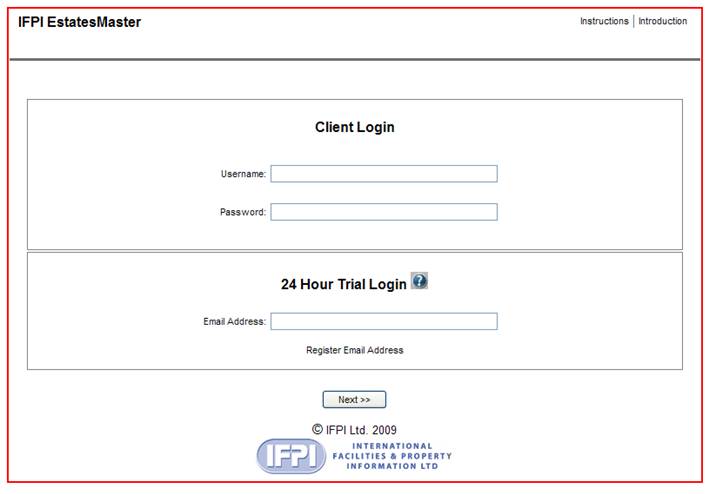
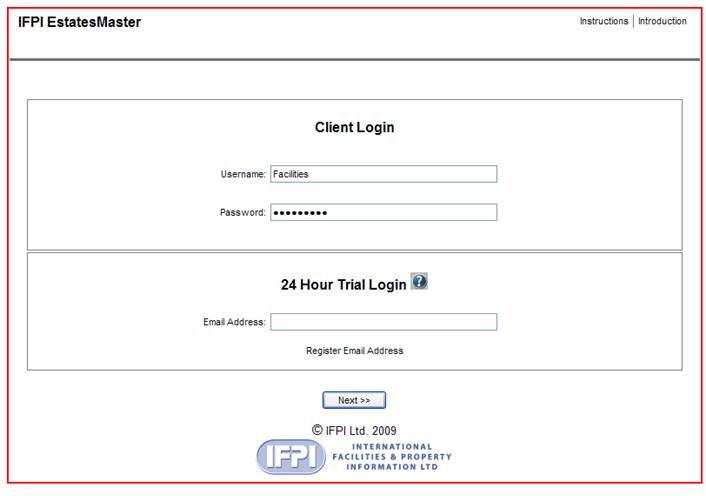
In the Client Login section insert
your User Name and Password
BUILDINGS AND GROUPS
Buildings
The buildings you want to benchmark/
estimate will have already been entered on your behalf from information you
have provided.
The
system can handle as many different building use categories as you want in a
single group, and the user can create as many groups as desired. Each building
is simply given its own unique reference and classified in such a way that its
use and special features are instantly identifiable. For example, one user has
adopted these classifications:
OH:
Offices – headquarters
OB: Offices – back
OA:
Offices – attached to industrial buildings
WSG:
Workshops – general purpose
WSI:
Workshops – with industrial services
LG:
Laboratory – general purpose
LS:
Laboratory – special purpose
CS:
Common support buildings (typically boiler houses, transformer sub-stations and
similar types)
You
will already have agreed the categories you wish to adopt and their acronyms
with the Licensor and they will be displayed with their reference Nos. on the
Operating screens we will tell you about below.
Groups
The creation of a Group or Groups of
buildings will also have been pre-determined and the allocation of the
buildings to their Groups will have been carried out by the Licensor. You can
have
as many Groups as you like but it is
best if you keep the number as small as possible; ideally buildings should be
grouped within their common economic regions within countries. Groups must
not span countries and at present the specific cost implications of regional
locations within a country can only be shown where they are grouped according
to these locations.
Where necessary buildings can be
separately assessed for their individual locations.
OPENING UP THE PROGRAM
Click on Next>> on the
Registration Screen and the General Options screen will appear.
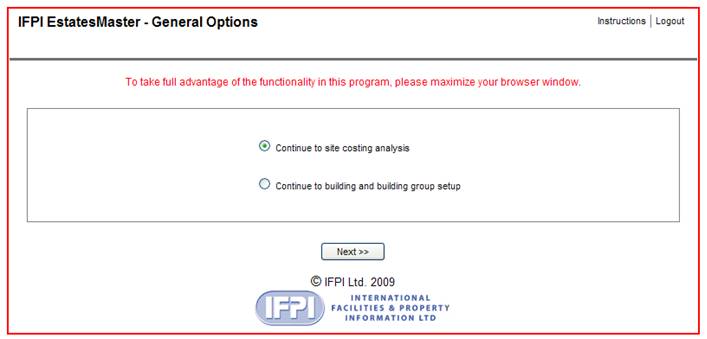
The only option for Licensees is the
first one – ‘Continue to site costing analysis’ because at present the
setting up of buildings and groups in the program is the sole responsibility of
the Licensor.
Selecting the first option by
clicking on Next>> you will then be presented with a screen offering you 3
options as follows:
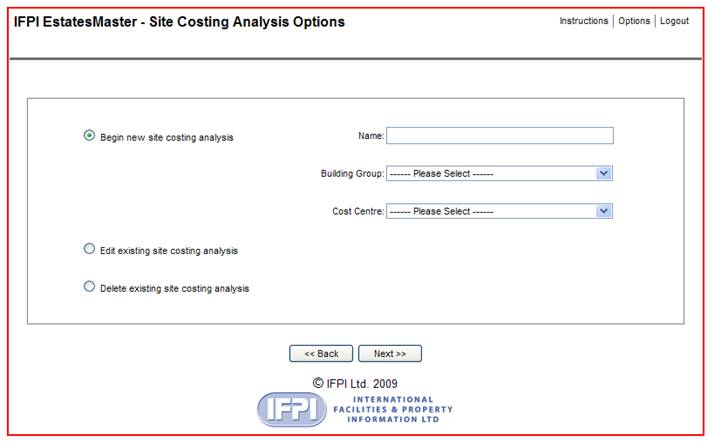
If you are starting from scratch you
must select the option ‘Begin new site costing analysis’’. The other 2
options clearly are only available when you have carried out and saved one or
more surveys. If you need to
- Refer to this set of user
instructions
- Go back to the previous menu of
options
- Logout
just click one of the tabs in the
top right hand corner of the screen.
BEGIN NEW SITE COSTING ANALYSIS
Naming the analysis
Each survey must have its own
identification. We recommend a continuous set of letters and numbers as follows:
e.g. BWDGCL28090909 – 1 where :
n BW = author’s initials
n DG= acronym for the Group – say Demo
Group or, if you are just surveying one building, the code for the building –
say HO for Head Office (BWHOCL280909)
n CL =Cleaning – but could be SM,FM or
SY for Services Maintenance, Fabric Maintenance or Security for example.
n 280909 =date
n -1 =version
Selecting the Group and Cost Centre
You then select the Group the building is in (if applicable)
and the Cost Centre you want to test – in this case Cleaning. If you try to
select a cost centre that is not yet ready for operation you will get a prompt
as follows:
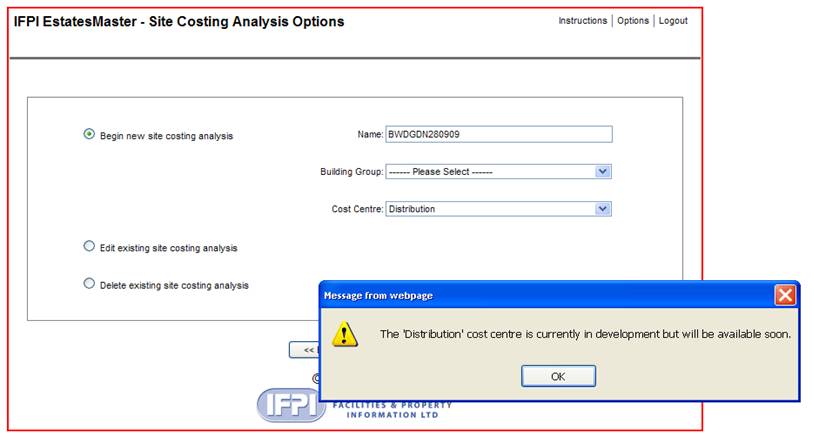
Note the name given here to the
proposed new analysis for the Distribution Cost Centre.
We cannot show you the name of the
Group in this text as we are taking the screenshots from a live project and
must protect the Licensee’s anonymity.
However we show below the Cleaning
selected from the full list of modules currently available (including those
which are not yet web-enabled) :
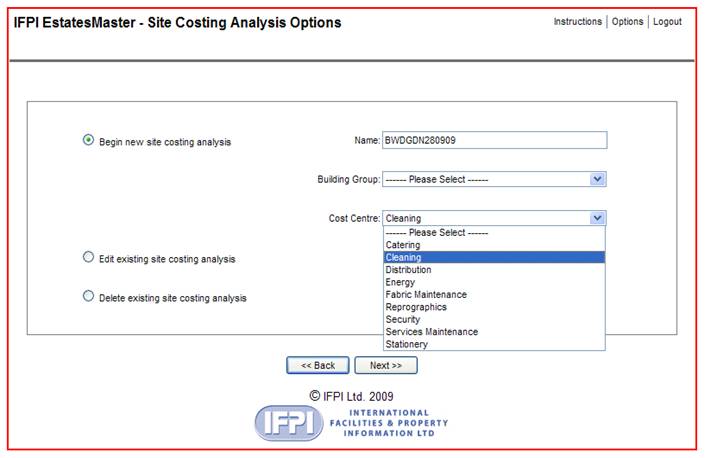
By clicking on Next>> we then
open up the Cleaning module at the first screen which is part of the Section
‘General’:
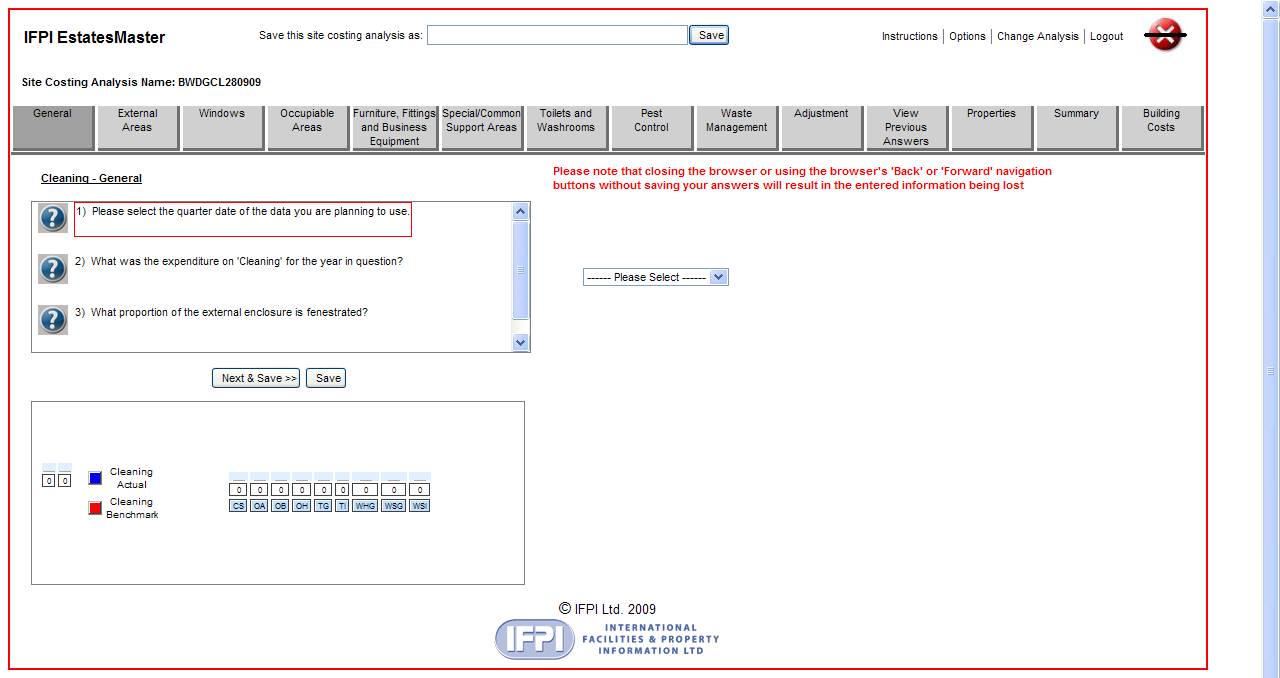
The Operational screen
There are several operations to be
carried out from this screen, so, starting from the top:

- ‘Save this site costing
analysis as’ : this is for when you want to go back in and edit an
existing survey (you don’t yet have one) in which case you can either give
it a new name e.g
BWDGCL280909-1 and SAVE
(also saving the original which will be saved under its own name) or just
use the survey for, say, sensitivity testing and don’t bother to SAVE in which
case the original will remain intact and all your doodled answers will not be
saved.

- ‘Instructions’ : Click the tab to
get to these Instructions.
- ‘Options’ : Click the tab to
get back to the General Options screen – see above
- ‘Change analysis’ : Click the tab if you
want to clear all you have done and start all over again on the survey.
Obviously the latter will not be saved.
- ‘Logout’ : takes you back to
the first login screen
 Whatever you do, do NOT
exit the program via the Close Program button! You will lose all unsaved
information.
Whatever you do, do NOT
exit the program via the Close Program button! You will lose all unsaved
information.
·
New
Name for survey

This is the name you gave the original
survey. If you want to save an amended version you can simply copy this into
the SAVE box above and add the -1 suffix, so BWDGCL280909-1
·
Select
sub-element

Each Cost Centre is broken down into the
sub-elements which form the total scope of the operations included in the
service. These are set out across the screen and you can access the question
screens for any one of them by clicking on the name.
The ‘General’ screen for Cleaning is
displayed above.
·
Other
functions
As well as those for
accessing the other sub-elements there are buttons for other functions; these
are described in more detail below

·
Exiting the screens

You can answer the questions in any
order but it is best to start at the beginning! Unless you answer all the
questions you will not be able to generate a cost benchmark. The current
question is lined in red.
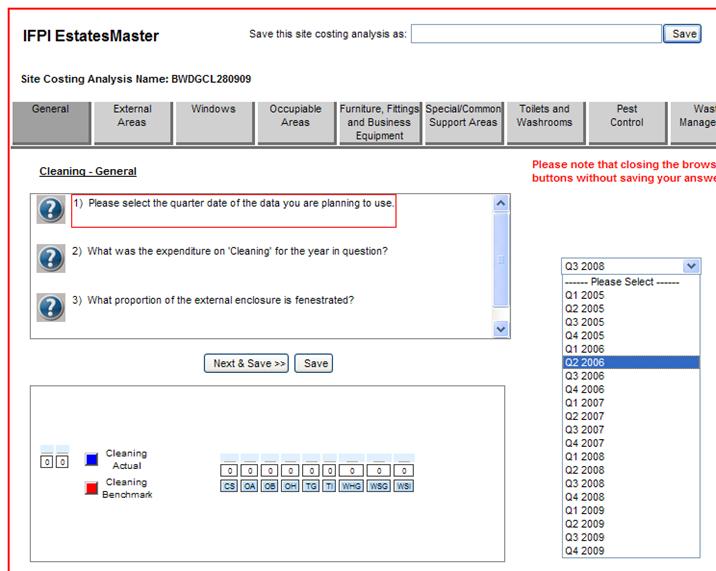
The first question asks about the date for the survey
and there is a dropdown menu of dates from which to choose.
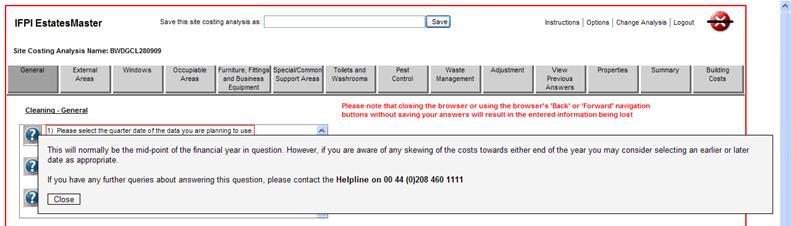
If you are not sure how to answer the
question, or need to know if there is anything special to be taken into
consideration before deciding, click on the
 alongside the question when
the Helptext will appear on your screen:
alongside the question when
the Helptext will appear on your screen:
Having made your selection you must Click on

which will take you to Q2.
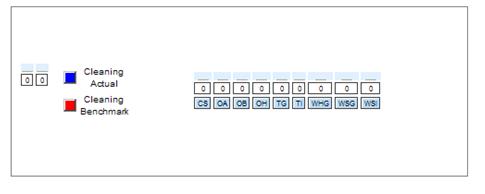
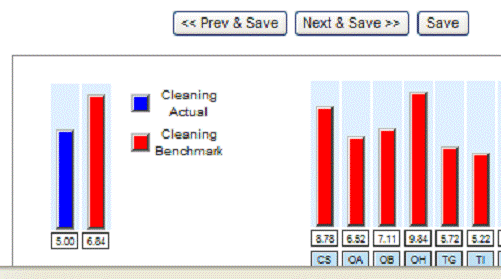
- Graphic depiction of results
The program will give you a running graphic depiction of the outcome of
the selections you have made and the data you have entered; the Actual and
Benchmark for the overall survey is given on the left of the graphics box. ’ On
the right the benchmarks will be shown for each building category you have
included in the survey.
- Moving on to the Operational screens
We now skip the next couple of questions and move on
to the Operational Screens which form the essence of the program. The
EstatesMaster version is illustrated here but the single building version is
almost identical.
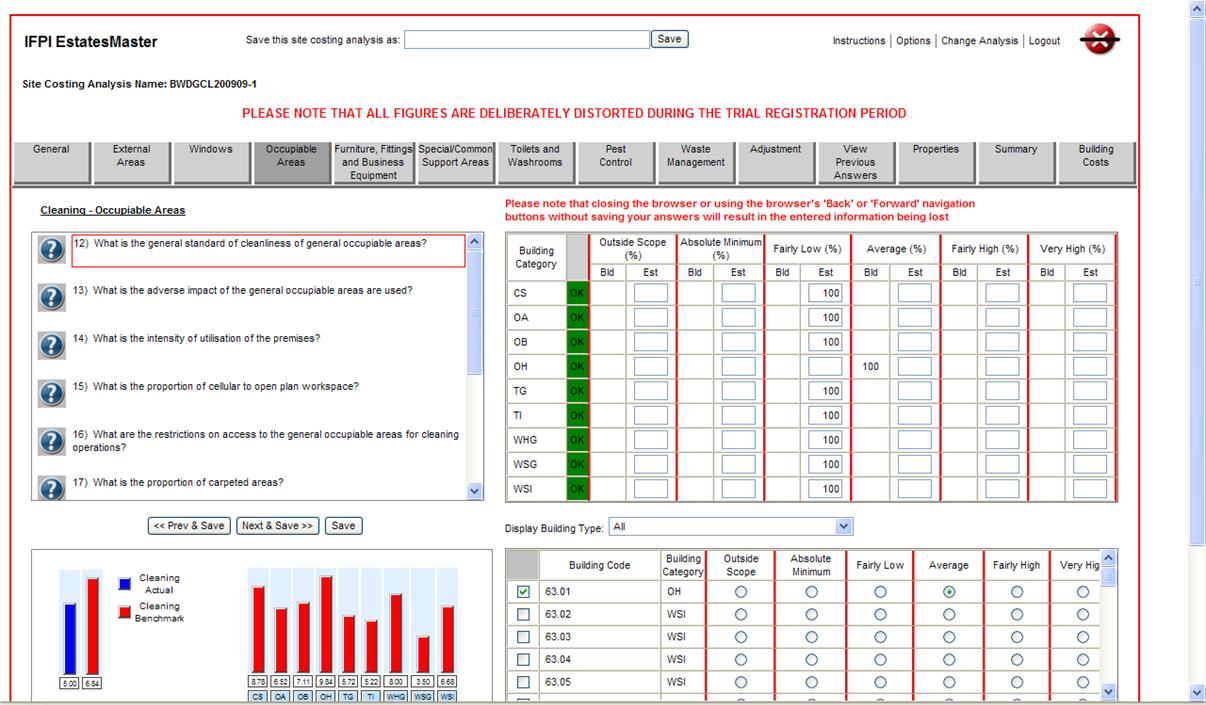
The screen we are now looking at is in the Occupiable
Areas sub-element of Cleaning. We arrive here after all the other screens have
been completed and we are now reviewing our answers to this question.
Graphics Box
Note that the Graphics Box at bottom left is
registering an excess of Benchmark over Actual (a rare occurrence which
probably means something is wrong in the way the questions have been answered!)..
Benchmarks for the individual categories of buildings are to the right of the
Graphics Box.
Building Categories
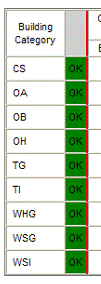
The building categories we have selected for this
Group are shown on the left-hand edge of the Percentage Allocation Box –see
below. The green OK means that answers to this question have been completed for
all the building categories in the Group
Percentage Allocation Box
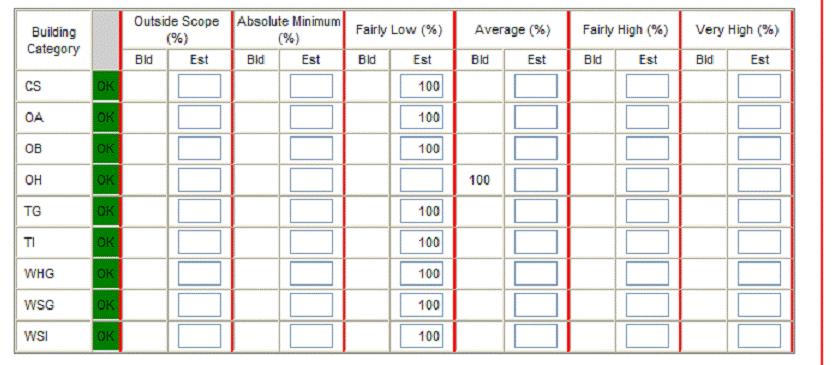
The EstatesMaster version allows you to answer the
question either building-by-building or for various proportions of the
buildings in each category. The Percentage Allocation Box is used for the
latter purpose. Here you can see that all the categories have been estimated at
‘Fairly Low’ (see Helptext for definition) except for the Head Office
(OH) which is set at ‘Average’.
The 100% could have been split between the answers to
this question for each or any of the categories.In this example the answer for
the OH category has been given for the individual building (see below)
which is why it is in the column ‘Bld’ (for Building-specific) as
opposed to ‘Est’ (for Estimated Percentage). The screenshot below shows
this splitting partly completed for the OA category; the -50% is a warning that the allocation must be made
up to 100% otherwise the program will not allow you to move on to the next
screen.
The program looks up the calibrated cost impact of
each answer (Average, Fairly High etc.) and allocates it to the building
categories in proportion to their gross floor areas. It further allocates the
cost impacts to the buildings in each category according to their gross
floor areas.
Splitting the allocation
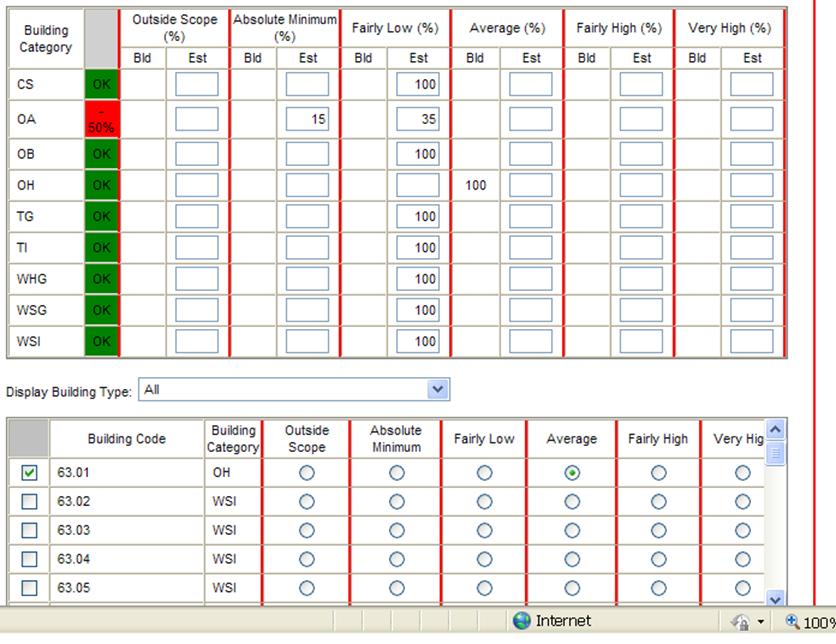
Answering for individual buildings
The above screenshot also depicts the Individual
Building Selection Box. The dropdown menu in the middle of this picture headed ‘Display Building Type’ is set to show all the buildings in the Group. It shows the
Building Code - 63.01 etc.- and the category each building is in
Here the OH building is seen as individually selected
as ‘Average’; as this is the only building of its category in this Group
it is also set as 100% in the ‘Bld’ column of the % allocation Box
above. The latter % can only be changed by altering the answer in the
Individual Buildings Box. This individual selection is useful in an estate
where one or more of the buildings are particularly significant and you want to
see how the answer to the question impacts on it directly. It also enables the
benchmark locked on to this answer to be allocated directly to the building
rather than merely being allocated from the whole category answers. This is
only an example and clearly in practice you would not use this feature in a
case like this where there is only one building in the category .
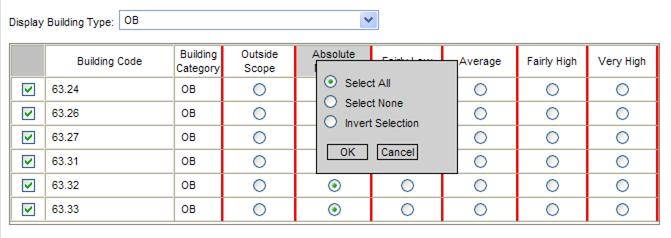
You can see all the buildings in one category, e.g.
all the OB (Back Offices) here:
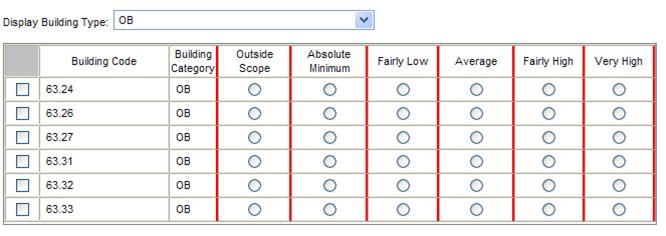
And you have the option to ‘Select All’ or Select-None’
of these buildings as an alternative to using the Percentage Allocation Box
above , by left-clicking on the Answer column heading. Here the answer
Absolute Minimum has been selected for all the OB buildings in the Group.
Moving on
Once you are happy with your answers you can move on
to any other question in this or any other sub-element. You can go to the next
question by clicking on Next&Save>> or to the previous question using
Previous&Save<< . Once you have done this any cost impacts will be
brought into play and the new answers will be available in graphic form as
below or by going to the Summary – see later.
Moving to another sub-element
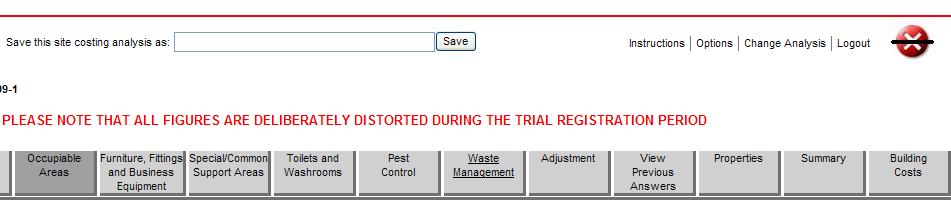
Alternatively, click on the sub-element button at the
top of the screen if you want to look at one of the other sub-elements e.g
Waste Management as shown here.
The Adjustments Screen
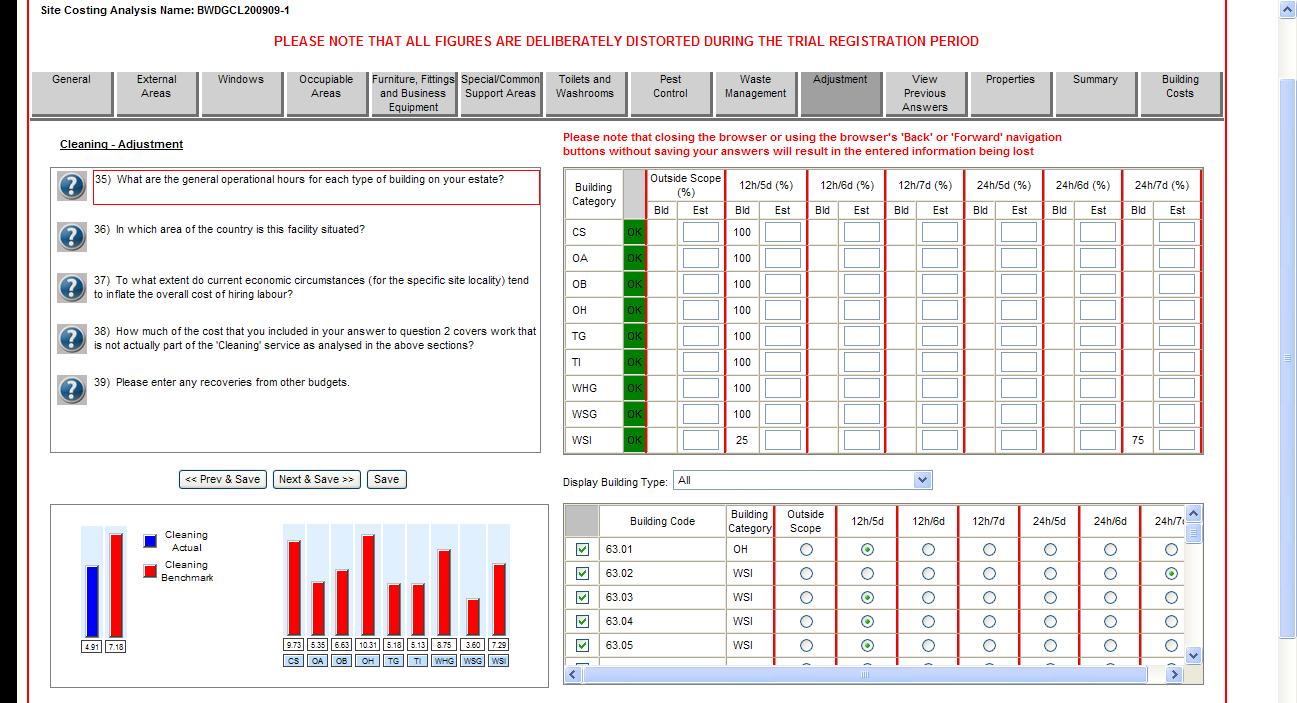
On this page you have the opportunity to make
adjustments to the calibration for a variety of different eventualities.ie.
- Hours of operation/occupancy
- Region
- Labour ‘hot-spots’
- Costs of work not covered by the benchmark
- Recoveries from other budgets.
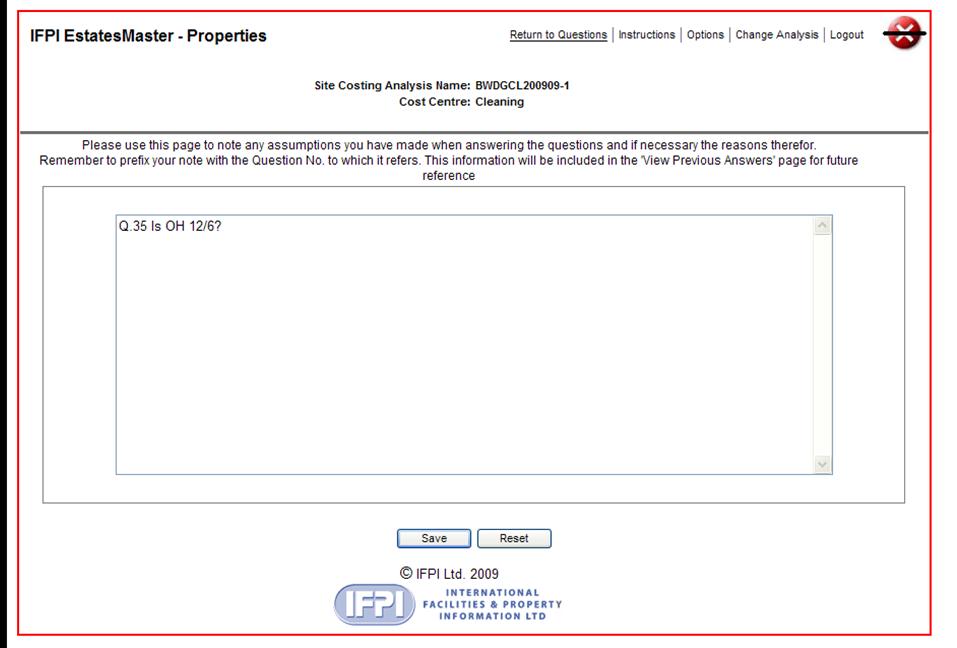
Properties.
Click on the Properties button on the top menu bar
and you will get a screen which allows you to make notes, comments and queries
for future reference in respect of the answers given to individual questions.
On completion Click on ‘Return to Questions’ to continue with the
survey.
 .
.
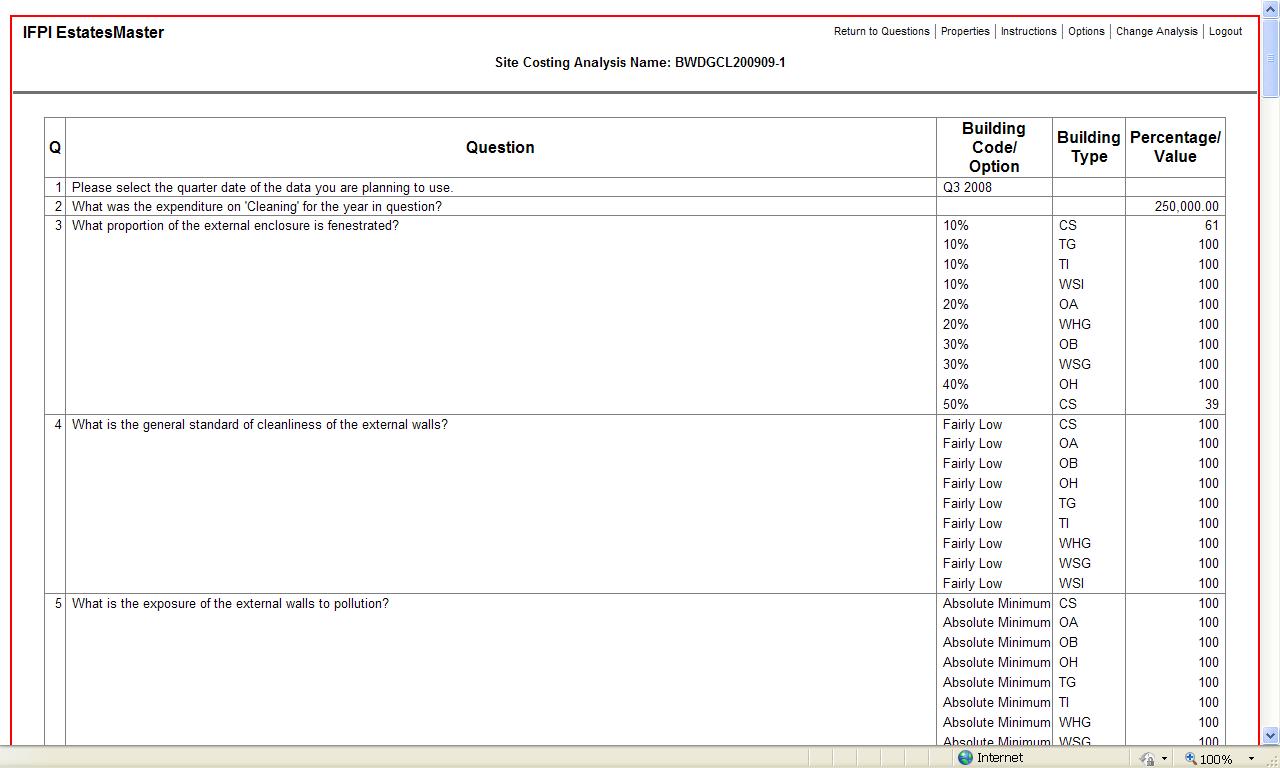
View Previous Answers
From the Questions screen you can review the answers
you have made to other questions by Clicking on ‘View Previous Answers’. This
screen also forms the basis of the Report which the program will provide in
pdf format for printing out as necessary.
Waiting for the web-screen
The advantages of having this program web-enabled are
enormous, not least because it does not involve updating and sending out
software so it can always be instantly updated and improved wherever you are.
Nevertheless there will always be times when the internet is exceptionally busy
so at these times please be patient – and try to remember how many weeks it
used to take consultants to get to an equivalent answer to the one this program
can get you to in minutes – and unlikely to be a more reliable one than you get
from this program when the questions are properly answered!
The Summary
So now to the output from all the hard work you have
put into making all the answers as reliable as possible. Click on ‘Summary’ on
the top menu bar:
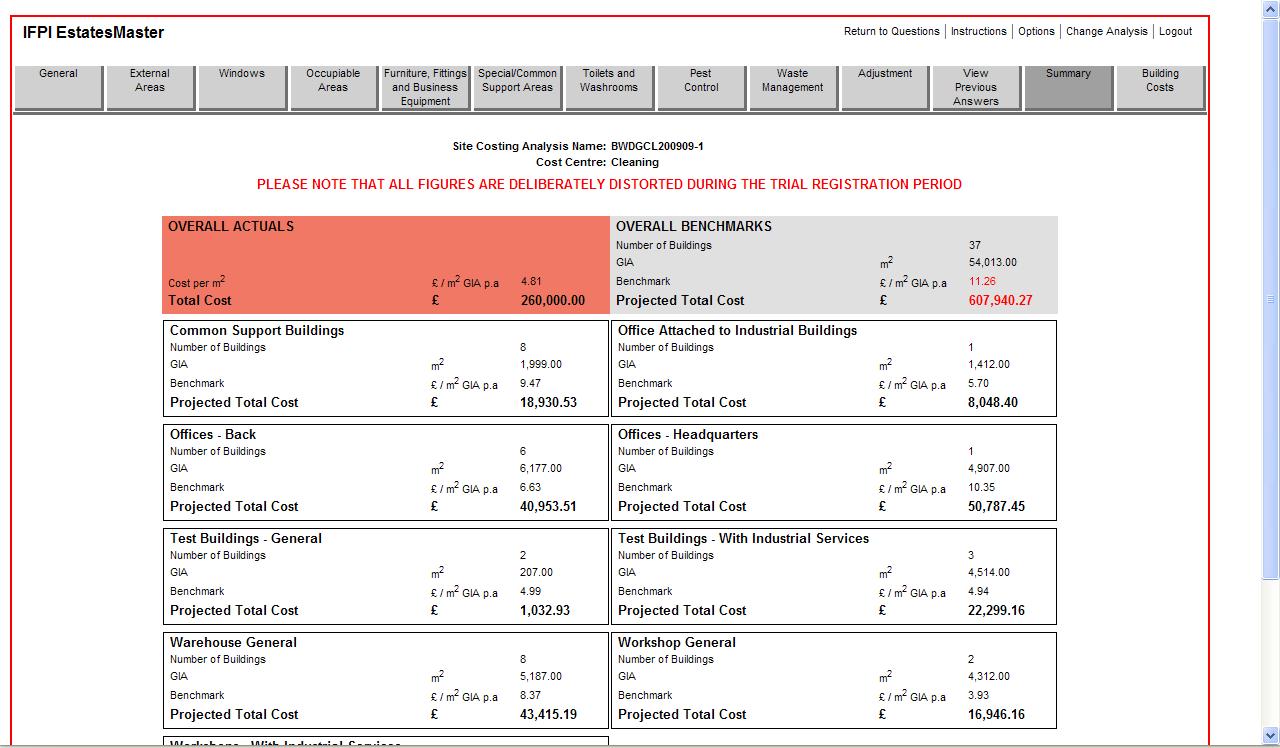
The orange box at top-left shows the figure you put
in at Q2 less any adjustments you have made at Q.38-39 (see above).
The grey box at top-right gives the overall benchmark
for the Cost Centre based on the answers you have given to the questions.
The other white boxes show how the benchmark or
estimate is divided between the different categories.
The Benchmark
As stated in the Introduction to this program the
benchmark produced is a best-performance target based on the answers you have
given to the questions – each of which has been identified as being of the greatest
significance in terms of the resources that need to be allocated to the service
in the particular circumstances.
The benchmarks are specific to your site and
buildings and have their roots in the authors’ massive data-base and great
experience of estimating and benchmarking costs of facilities services (see
Introduction).
If there is a discrepancy between the Actuals and the
Benchmarks it will be because :
- There is a genuine discrepancy which needs to be
investigated to find the process or procurement reasons for any abnormally
high or low costs.
- The answers are not filled in correctly
- In particular the Actual cost may have been
mis-calculated and/or
- The scope of the work may have been mis-stated.
One thing however you can be sure of –
THE BENCHMARK IS HIGHLY UNLIKELY TO BE
WRONG PROVIDED YOU HAVE ANSWERED THE QUESTIONS CORRECTLY.
Please don’t fall into the trap of believing that the
program is not calculating properly or is wrongly calibrated because it won’t
be. The truth may not lie in any inefficiency or exceptional efficiency but in
the data being used in the process. If that is all that is wrong it is still as
well to find out about it – better than carry on working with unsatisfactory
grasp of the cost structure of your facilities!
First strike
The benchmarks have been found over and
over again to be very close to the actuals in well-run facilities. However, no
claim is made for the program to produce anything other than ‘First Strike’
benchmarks – i.e. benchmarks that will highlight services in buildings which
appear to be out of kilter with the norm for what is being provided.
Anything within 10% to 15% of the
benchmark may not be considered to be worth investigating further unless it is
a large expenditure, although the probability is that the benchmark produced by
the model is a realistic target cost for the service.
Individual Building Benchmarks
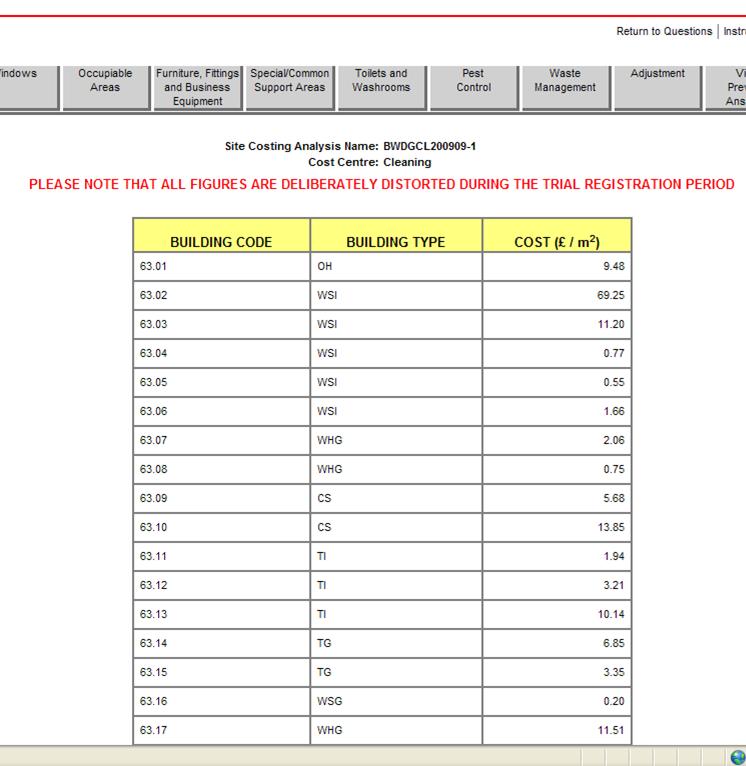
Finally, the ‘Building Costs’ tab on the top
bar menu will take you to an analysis of the benchmark per sq.m GIA for each
individual building. This analysis takes into account the %age allocations made
for the category and any individually answered questions for specific buildings
Return to Menu